Diagnostics €10 · no registration required

Volkswagen navigation maps

We update Volkswagen navigation maps for MCD, MFD2, RNS 310, RNS 315, RNS 510, RNS 810 and MFD3 systems in Vilnius, Kaunas and Klaipėda. A warranty is provided for the work.

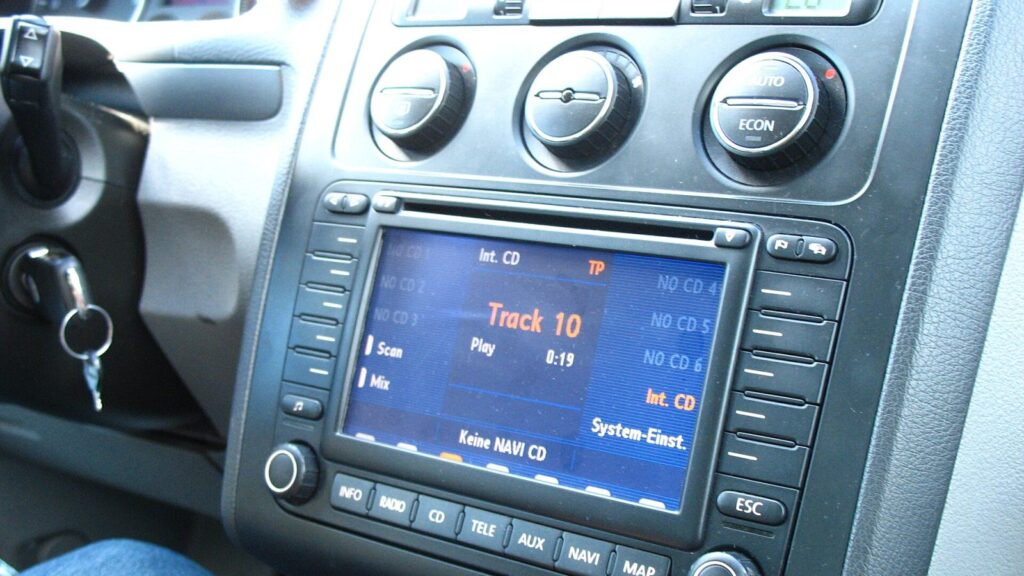
Volkswagen car navigation screen with a map MCD, MFD, RNSSystems we update Warranty on work
MCD, MFD, RNS
Systems we update
10 €
Initial diagnostics
Vilnius, Kaunas, Klaipėda
Update locations
Mon–Fri 9–18
Working hours

4 service points – bring it to the nearest one

  1. Vilnius Kareivių g. 11A, Žirmūnai +370 679 74770
  2. Каунас Baltijos g. 58, Šilainiai +370 656 95553
  3. Клайпеда Sausio 15-osios g. 13 +370 617 77731
  4. Šiauliai Gegužių g. 30, PC „Arena“ +370 659 83704
  • No appointment needed
  • Diagnostics €10
  • Mon–Fri 9–18
  • All contacts

Volkswagen navigation maps do not update themselves in the car’s system: whatever was installed at the factory or during the last update is what remains. We update maps for MCD, MFD2, RNS 310, RNS 315, RNS 510, RNS 810 and MFD3 systems, as well as the Phaeton VDO NT system.

The most important thing is to identify exactly which system is installed in your car, because RNS 310 and RNS 315 cards are not interchangeable. How to do this is described below. You can come to any service center during working hours, no prior registration is required.

  • Do you update RNS 310 and 315? Yes, we update the maps of both systems, but their cards are incompatible, so we first determine the actual system type.
  • How much does the diagnostics cost? The initial diagnostics costs 10 €. The update price is given after the diagnostics and agreed before the work.
  • Do I need to register? No. Come to the Vilnius, Kaunas or Klaipėda service center during working hours, Mon–Fri 9:00–18:00.
  • Will you update RNS 300? No, we do not update maps for the RNS 300 („TravelPilot EX”) system.
Most common problems with Volkswagen navigation

Not every issue is solved by a map update. Below are the most common cases and what you can check yourself.

01€10 diagnostics

The navigation doesn’t know about new roads and roundabouts

WhyThe maps were installed long ago and do not update themselves.

Check yourselfCheck which system is installed in the car and when the maps were last updated.

What we doWe update the maps according to the system type.

02€10 diagnostics

New SD card does not work in RNS 310 or RNS 315

WhyThe cards of these systems are not interchangeable, even though they look the same.

Check yourselfPress SETUP and hold for 5–10 seconds, then look at VERSIONS: 3 lines means RNS 310, 6 lines means RNS 315.

What we doWe determine the actual system type and select the suitable card.

03€10 diagnostics

Navigation does not read the disc or card

WhyThe set may be unsuitable, the surface of the media may be dirty or damaged, or the system may be faulty.

Check yourselfRemove the card or disc, check for scratches or dirt, and insert it again.

What we doDuring diagnostics, we find out whether the problem is in the media or in the system itself.

04€10 diagnostics

Navigation shows the wrong location

WhyThe cause may be outdated maps, a weak satellite signal or equipment failure.

Check it yourselfDrive to an open area and wait a few minutes until the system finds the satellites.

What we doDuring diagnostics, we determine whether a map update or equipment repair is needed.

Prices

The map update price depends on the system, so it is given after diagnostics.

ServicePriceWarranty
Initial diagnostics10 €–
The final map update price is given after diagnostics and agreed before work begins.

Myths about Volkswagen navigation updates

  • Myth. RNS 310 and RNS 315 cards are interchangeable because the systems look the same. In fact. Although they look the same, the cards are not interchangeable. The RNS 315 has internal memory, while the RNS 310 does not.
  • Myth. Updating the maps always updates the software too. In fact. The firmware is not changed during a map update. It usually does not need to be updated, and it is not part of the map update.
  • Myth. Lithuania is detailed in all map sets. In fact. Detailed Lithuania is not included in all sets. For example, the Europe set for MCD and RNS2 does not include Lithuania.

Which Volkswagen systems we update maps for

The map set depends on which navigation system is installed in the car, not on the model alone. Different systems could be installed in the same model in different years.

  • RNS 510, RNS 810 and MFD3 – maps are written to the internal hard drive, and Lithuania is provided in detail.
  • RNS 310 and RNS 315 – maps on an SD card, for cars manufactured before mid-2011.
  • MFD2 (RNS MFD2, „BlauPunkt TravelPilot EX”) – for 2005–2007 cars, Lithuania, Latvia and Estonia are provided in detail.
  • MCD, RNS 2-DIN and RNS2 („TravelPilot DX”) – Europe maps; Lithuania is not included in this set.
  • Phaeton VDO NT – Europe maps with detailed Lithuania.
  • RNS 300 („TravelPilot EX”) – we do not update maps for this system.

If you are not sure about your system, take a photo of the screen with the navigation turned on and show it to the technician – this helps to select the right set faster.

Navigation update in Kaunas – a technician checks a navigation unit at the Šilainiai service centre

How to identify RNS 310 and RNS 315

These systems look the same, but their cards are not interchangeable. The RNS 315 has internal memory, while the RNS 310 does not.

You can identify it yourself: press SETUP and hold for 5–10 seconds until the VERSIONS menu opens. If 3 lines of information are shown, it is an RNS 310; if 6 lines, it is an RNS 315.

  • Software version 026x or 04xx means RNS 310.
  • Other versions mean RNS 315.

What the map update includes

When updating maps, the software (firmware) is not changed. In systems with a hard drive, the maps are written to the internal drive, so you do not keep the update disc.

A software update is usually not necessary and is not included in the map update. If it were needed, it would be assessed separately.

Detailed Lithuania is written only in those sets where it is indicated as detailed. We can confirm the specific list of countries for your system.

Which Volkswagen models are suitable

The RNS 510, RNS 810 and MFD3 systems are suitable for, for example, Caddy, Golf, Jetta, Passat, Passat CC, Scirocco, Tiguan, Touran, Touareg, Phaeton, Multivan, Transporter and Caravelle manufactured approximately in 2006–2009 and later. Exact compatibility depends on the specific trim level.

The RNS 310 and RNS 315 systems are suitable for various Volkswagen models up to mid-2011: Caddy Life, Golf, Golf Plus, Bora, Jetta, Passat, Polo, Scirocco, Tiguan, Touran, Touareg and EOS.

When maps are worth updating

An update is worthwhile when the navigation does not know new roads, roundabouts or bypasses, suggests an old route, or new addresses are missing on the screen. A lot depends on when the maps were last written.

If the navigation shows an incorrect location, the map is not always to blame – it may be a signal or equipment problem. Read more about this in the article „Why the navigation shows the wrong location”.

General information about navigation systems of other brands can be found on the page „Navigation updates”.

How the work is done at the service center

You come to the service center in Vilnius, Kaunas or Klaipėda during working hours, Mon–Fri 9:00–18:00. The technician identifies the system and selects the map set.

The initial diagnostics costs 10 €. The final price is stated and agreed before the work, and a warranty is provided for the work performed.

What to prepare before you come

  • Find out the name of your system (RNS 310, 510, MFD3, etc.).
  • Distinguish RNS 310 and 315 using the SETUP and VERSIONS menu.
  • Know your car’s model and year of manufacture.
  • Bring your existing SD card or disc, if you have any.
  • Come during working hours, Mon–Fri 9:00–18:00.

How to update Volkswagen navigation maps

  1. Identify the system. Check which navigation is installed: RNS 310, RNS 315, RNS 510, RNS 810, MFD2, MFD3 or another. Distinguish RNS 310 and 315 using the SETUP and VERSIONS menu.
  2. Come to the service center. To the service center in Vilnius, Kaunas or Klaipėda during working hours, Mon–Fri 9:00–18:00. No prior registration is required.
  3. The technician checks the system. The initial diagnostics costs 10 €. The technician confirms the system type and the suitable map set.
  4. Agree on the price. The final price is stated after the diagnostics and agreed before the work begins.
  5. Pick up your car navigation with updated maps. A warranty is provided for the work performed.

Frequently asked questions about Volkswagen navigation maps

How to update Volkswagen navigation maps?

It depends on the system. RNS 310 and 315 use an SD card, while RNS 510, 810 and MFD3 maps are written to the internal drive. Come to the service point, and the technician will identify the system and select the right set.

Do I need to register in advance?

No. Simply come to any service point during opening hours, Mon–Fri 9:00–18:00. Service points are closed at weekends.

How much does a map update cost?

The price depends on the system and the map set. The initial diagnostics cost €10, and the final price is quoted and agreed before the work begins.

Is the software changed during the update?

No, the firmware is not changed during a map update. In most cases it does not need to be updated, and if it ever does, that is not part of the map update.

Do you update maps for the RNS 300 system?

No, we do not update maps for the RNS 300 („TravelPilot EX”). Updates are available for the other systems listed on this page.

Will Lithuania be detailed after updating the maps?

Only in the sets where Lithuania is listed as detailed, for example RNS 510, 810, MFD3, MFD2 and Phaeton. Lithuania is not included in the MCD and RNS2 set.

Other car brands

Professional navigation update – prices, process and service points

Is your device broken?

Give us a call – we will tell you what we can do and how long it will take.

Call Find a service point