Diagnostics €10 · no registration required

Audi navigation update

Audi navigation update for MMI, MIB and RNS-E systems: the latest maps of Lithuania and Europe with a 1-year warranty. Come to our service point without an appointment.

Audi navigation screen in the car interior MIB, MMI, RNS-EWhat we update Warranty on work
MIB, MMI, RNS-E
What we update
1 year
Warranty on maps
10 €
Initial diagnostics
Vilnius, Kaunas, Klaipėda
Where we update

4 service points – bring it to the nearest one

  1. Vilnius Kareivių g. 11A, Žirmūnai +370 679 74770
  2. Каунас Baltijos g. 58, Šilainiai +370 656 95553
  3. Клайпеда Sausio 15-osios g. 13 +370 617 77731
  4. Šiauliai Gegužių g. 30, PC „Arena“ +370 659 83704
  • No appointment needed
  • Diagnostics €10
  • Mon–Fri 9–18
  • All contacts

An Audi navigation update is needed when the system no longer knows new streets, roundabouts or motorway sections and directs you where the road no longer exists. We update maps for Audi MIB, MMI 3G+ (HN+), MMI 3G (HNav, BNav), MMI 2G, RNS-E and RNS4.x / BNS4.x (TravelPilot DX) systems. Many sets include detailed Lithuanian data.

This page is dedicated to Audi. You can find general information about navigation updates for all makes on the main navigation page.

  • How much does an Audi update cost? The price depends on the system (MIB, MMI 3G, 2G, RNS-E). We will tell you the price after inspecting your system; the initial diagnostics cost 10 €, and the final price is agreed before any work begins.
  • Do I need to book an appointment? No. Visit any service point during working hours, Mon–Fri 9:00–18:00. There is no need to call in advance.
  • What warranty is provided for maps? We provide a 1-year warranty for Audi map updates.
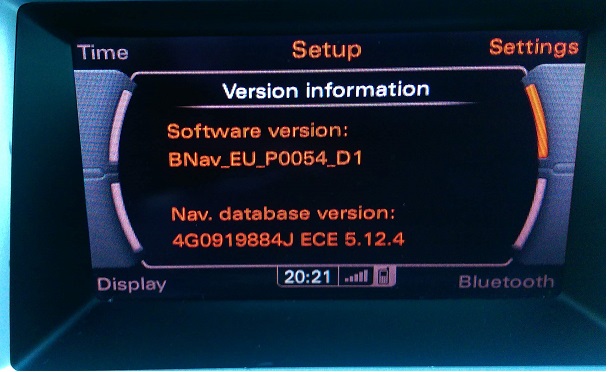
  • How do I know which system I have? You can check the version in the „Version information” menu (e.g., HN+, HNav, BNav). If you cannot find it, we will check on site.
What the symptoms show: when an Audi map is outdated

Sometimes a navigation problem is related to outdated data or an unreadable storage medium.

01from 60 €

The navigation leads along roads that do not exist

WhyThe maps are old: new road sections, roundabouts and traffic layouts have not been loaded.

Check it yourselfIn the „Version information” menu, look at the map release year.

What we doWe install the latest maps of Lithuania and Europe for your system version.

02

Audi navigation does not detect the SD card

WhyThe card may be damaged, of the wrong version, or inserted into the wrong slot. MMI 3G systems use two SD cards.

Check it yourselfRemove and reinsert the card, and check that it is not damaged.

What we doWe check the card and the system, and restore or rewrite the data.

03from 70 €

Audi navigation disc cannot be read (CD)

WhyMMI 2G with CD and RNS-E use discs. A scratched or outdated disc or a dirty reader can cause an error.

Check it yourselfCheck that the disc is clean and has the correct number (e.g., Eastern Europe with detailed Lithuania).

What we doWe provide the correct map set and assess the condition of the reader.

04from 60 €

A map of a new country or city is missing

WhyAn older version simply does not include new data or a certain country, for example Croatia or Slovakia.

What we doWe select a map version that covers the required countries.

05from 10 €

Navigation does not start after the update

WhyThe wrong version may have been installed, or the writing process may have been interrupted. Problems can also occur when the installed maps are not intended for your system version.

Check it yourselfDo not try to repeat the installation if you are not sure about the file used.

What we doWe diagnose the system and install the correct software version.

0610 €

Navigation shows the wrong location

WhyThere may be a poor satellite signal or an old map. Read more about this in the article about the wrong location.

Check it yourselfDrive to an open area and wait a few minutes.

What we doWe determine whether the map or the GPS component is at fault.

Audi map update prices

Indicative prices by system type; we will tell you the exact price once we see your Audi system.

Diagnostics

ServicePriceWarranty
Initial diagnostics10 €–

Newer systems

ServicePriceWarranty
MIB map update (Audi from 2015)from 90 €12 months
MMI 3G / 3G+ (HNav, HN+, BNav) updatefrom €7012 months

Older systems

ServicePriceWarranty
MMI 2G with hard disk drive (HDD)from €7012 months
MMI 2G CD, RNS-E or RNS4.x disc setfrom 60 €12 months

Myths about Audi navigation updates

  • Myth. The same map file fits every Audi. In fact. No, the version depends on the system: MIB, MMI 3G+, 3G, 2G or RNS-E use different formats.
  • Myth. A map update will erase my settings and contacts. In fact. A map update changes only the navigation data; personal settings usually remain, although you can write down important addresses before updating.
  • Myth. There is no point in updating an old Audi. In fact. Quite the opposite – newer maps are available even for 2004–2012 systems, and it costs less than a new unit.

Which Audi navigation systems we update

We update MIB (Audi A1, A2, A3, A4, A5, A6, A7, A8, RS6, Q3, Q5 and Q7 from 2015), MMI 3G+ (HN+) and MMI 3G (HNav, BNav) with a hard disk drive, MMI 2G with HDD or CD, RNS-E, as well as RNS4.x / BNS4.x and TravelPilot DX. Exact compatibility depends on the model and production date.

  • MIB – Lithuania (detailed) and Europe, from 2015
  • MMI 3G+/3G – 7-inch screen, two SD cards, 40 GB HDD
  • MMI 2G – HDD or CD discs
  • RNS-E and RNS4.x / BNS4.x – navigation discs

If you do not know which system you have, you can check its version in the „Version information” menu.

SD card with navigation maps

What you may need during your visit

Depending on the system, you may find it useful to have the car, an SD card or a navigation disc. This is for information only, not a requirement: no appointment is needed. You can find out more about the process in the article on how to update your car navigation.

What may come in handy during your visit

  • A car with a navigation system
  • An SD card or CD discs, if your system uses them
  • The system version from „Version information”, if you know it
  • The navigation or radio PIN code, if required
  • Important saved addresses
  • A brief description of the problem

From arrival to pick-up

  1. Come in. To any service point during working hours, Mon–Fri 9:00–18:00, no appointment needed.
  2. We identify the system. We choose the suitable maps according to the model and version; the initial diagnostics cost €10.
  3. We agree on the price. We tell you the final price and turnaround time before starting work.
  4. We install the maps. We update the navigation and check that it works.
  5. You collect it with a warranty. Map updates come with a 1-year warranty.

Customers often ask about Audi navigation

Can the navigation of an Audi A6 C7 be updated?

Yes, we choose the suitable option according to the system: MMI 3G+ or MIB. Different systems require different files.

Will the Audi navigation include maps of Croatia?

Croatia is included in the MIB, MMI 3G+ (HN+) and MMI 3G (HNav, BNav) sets, as well as MMI 2G with HDD and on the third RNS-E disc. We will tell you the exact list of countries for your system.

Which systems have maps on an SD card?

MMI 3G and 3G+ use two SD cards. Systems with MMI 2G with HDD do not use an SD card.

Are CD discs still suitable?

MMI 2G with CD, RNS-E and RNS4.x work with discs. Newer sets are available. For more details, see the map update article.

Other car brands

Professional navigation update – prices, process and service points

Is your device broken?

Give us a call – we will tell you what we can do and how long it will take.

Call Find a service point