Printing defects look similar, but their causes differ. Below are the symptoms as people type them into a search, and what usually lies behind them. You can see the cartridge refill price in the price list, and the initial printer diagnostics cost €10.
01from 12 €
The printer prints faintly or with faded output
WhyThe most common cause is that the toner in the cartridge is running out. Less often, a worn drum or an enabled toner-saving mode is to blame.
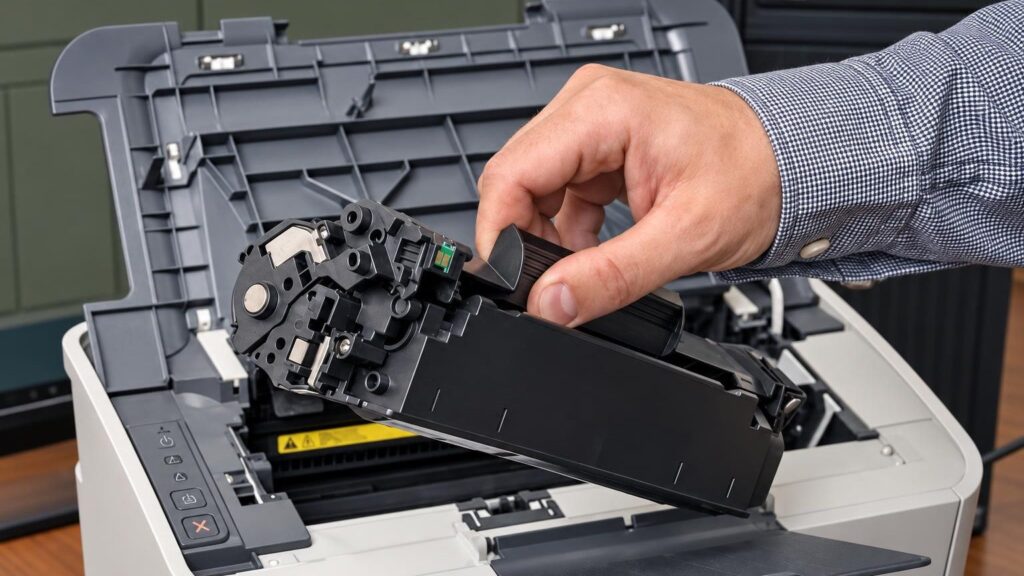
Check it yourselfOpen the printer cover, take out the cartridge and carefully shake it horizontally back and forth, then put it back in. Check whether the toner-saving mode is enabled in the print settings.
What we doWe check the cartridge and refill the toner, or replace it with an already refilled one – according to the price list, the cartridge refill price starts from €12. If the faintness persists, we check the drum and other components: the initial diagnostics cost €10, and the repair price is agreed after the diagnostics.
02from 12 €
The printer does not print in black
WhyThe cartridge is empty, the toner supply is clogged, or the cartridge contact is damaged. In colour printers, it may be specifically the black cartridge that is empty.
Check it yourselfMake sure the cartridge is inserted all the way and that the protective strip or film has been removed from the new cartridge.
What we doWe test the cartridge, then refill or replace it (refill price according to the price list). If there is toner but nothing prints, we check the drum and the cartridge contacts – the €10 initial diagnostics applies to this.
03from 5 €
The printer does not detect the cartridge or says „cartridge not compatible“
WhyAfter a refill or with a non-original cartridge, the printer sometimes fails to recognise the microchip (chip). The contacts may also be dirty, or the cartridge may not be suitable for the model.
Check it yourselfRemove and reinsert the cartridge, and gently wipe the visible contacts with a dry cloth. You will find more tips in the article printer does not show the cartridge.
What we doWe check whether the cartridge matches the model and, if necessary, transfer or install a new chip. Chip prices start from €5 (see the chip price list); for some models, we order the chip separately.
0410 €
Black streaks or stripes across the whole page
WhyMost often the drum is damaged, the cleaning blade is worn, or the waste toner container is too full. Too much toner or unsuitable toner can also leave streaks.
Check it yourselfPrint a test page and see whether the streaks repeat at an even distance – this points to the drum or a roller. More in the article why a laser printer prints faintly.
What we doFirst we determine the cause: the initial diagnostics cost €10. Then we clean the inside of the cartridge, replace worn parts, or suggest replacing the cartridge. If the streaks remain with a different cartridge, we diagnose the printer itself, and the repair price is agreed after the diagnostics.
05from 12 €
Toner stains, grey background or crumbling toner
WhyA worn drum or cleaning blade, a leaking cartridge, or the wrong type of toner. A grey background indicates that toner is getting where it should not.
What we doWe check whether the cartridge is leaking, clean it and refill it with the right type of toner (refill price according to the price list). If the drum is worn, we will tell you whether it is worth repairing or whether it is better to replace the cartridge.
06from 5 €
Printer shows an error after the cartridge has been refilled
WhyMost often it is an unrecognised chip or an incorrectly inserted cartridge. Sometimes the printer registers that the cartridge has been refilled and shows a low toner level even though it is full of toner.
Check it yourselfTurn off the printer, remove the cartridge, wait a minute and reinsert it. Do not open the inside of the printer itself.
What we doWe check whether the cartridge matches the model and, if necessary, transfer or replace the chip (e.g., Xerox 3020, Minolta 1480/1490, Xerox 3119). Chip prices are listed in the chip price list.
07from 18 €
HP M110w or M140w cartridge not working after refilling
WhyHP LaserJet models with the letter “e” at the end of the name (e.g., M110we, M140we) are designed for the HP+ service and do not allow the use of compatible cartridges. In such devices, a refilled cartridge will not work.
Check it yourselfLook at the model name on the printer: if it ends with “e”, compatible cartridges will not work.
What we doWe check whether your model is compatible with the HP 142A cartridge. For models without “e”, a refill costs €18 (without a microchip, your chip is transferred) or €25 (with a microchip).
08
Cartridge does not fit or does not seat properly in the printer
WhyCartridges for similar models differ in size or mounting. For example, a cartridge intended for the P2050 series does not fit the HP LaserJet P2035, even though the codes are similar.
Check it yourselfCompare the cartridge code with the one indicated on the label on the cartridge or the printer.
What we doWe select the correct cartridge according to the model. If your model is not in the price list, bring in the cartridge and we will tell you whether we can refill it.