Diagnostics €10 · no registration required

Console repair: PlayStation, Xbox and Switch

Console repair in four cities: PlayStation, Xbox and Nintendo. First, we determine the cause of the fault for 10 €, and we agree on the repair price before starting work.

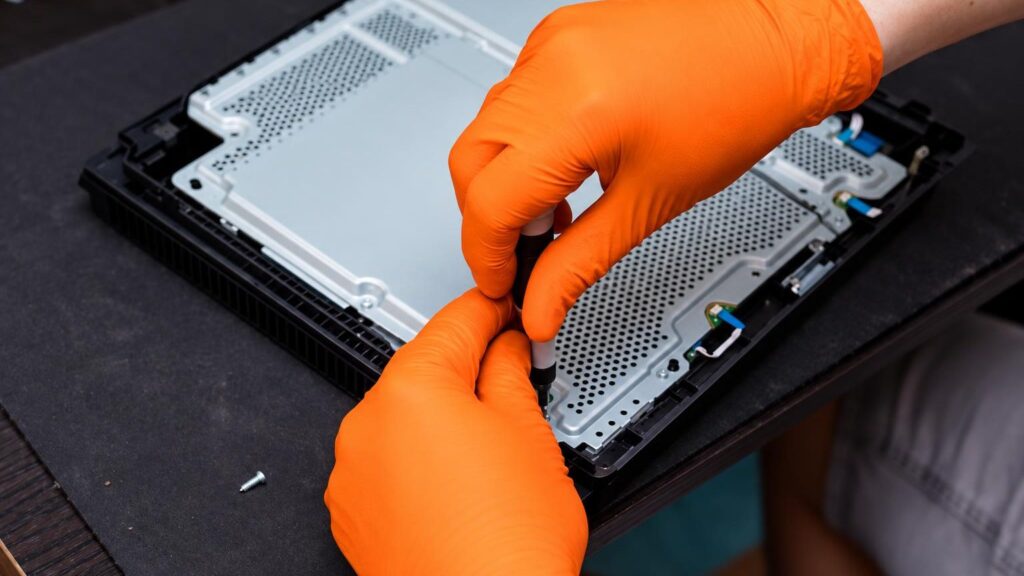
A technician repairs a game console under the light of a workbench PlayStation, Xbox, NintendoWhat we repair Warranty on work
PlayStation, Xbox, Nintendo
What we repair
from €20
Repair
10 €
Initial diagnostics
Vilnius, Kaunas, Klaipėda
Service points

4 service points – bring it to the nearest one

  1. Vilnius Kareivių g. 11A, Žirmūnai +370 679 74770
  2. Каунас Baltijos g. 58, Šilainiai +370 656 95553
  3. Клайпеда Sausio 15-osios g. 13 +370 617 77731
  4. Šiauliai Gegužių g. 30, PC „Arena“ +370 659 83704
  • No appointment needed
  • Diagnostics €10
  • Mon–Fri 9–18
  • All contacts

Console repair does not start with replacing parts, but with a question: what is the console doing, and what has it stopped doing? Some faults lie in a port or a controller and cost little, others are in the power circuit or the motherboard. So that we don’t have to guess, we first inspect every console and only then tell you how much the repair will cost.

Below you will find a symptom guide, approximate prices and answers to the most common questions about repairing PlayStation, Xbox and Nintendo Switch. If your console’s fault resembles one described here, you will immediately see what to expect. If not, simply bring it to any service point during working hours, no appointment needed.

  • How much does console repair cost? The initial diagnostic costs €10. Simple repairs, such as replacing a controller stick, start from €20. We give you the exact price after the diagnostic.
  • How long does the repair take? The turnaround time depends on the fault and the parts. We tell you the specific time after the diagnostic, together with the price, before starting work.
  • Do I need to book in advance? No. Just come to any service point in Vilnius, Kaunas, Klaipėda or Šiauliai on weekdays from 9:00 to 18:00.
  • Is it worth repairing a console? Most often yes, if the repair costs considerably less than an equivalent new or used console. After the diagnostic, we will compare the numbers.

What console symptoms indicate

People usually search not for the name of a fault, but for what they see on the screen or hear from the console. That is why we have listed the symptoms the way customers describe them. Prices are approximate; the final price is determined after the diagnostic.

01from €50

PlayStation 5 or PS4 won’t turn on

WhyMost often the cause is the power circuit, a faulty power supply unit or a socket, sometimes a motherboard failure after a power surge. The console may respond only with a short beep or a flash of light and then switch off again.

Check it yourselfCheck that the wall socket works, try another power cable, and plug the cable in more firmly. Disconnect the console from power for a few minutes and try again. Do not open the console – there are mains-voltage parts inside.

What we doWe measure the power circuit, check the power supply unit and the motherboard voltages, and replace faulty components. We wrote about this fault in more detail in the article PlayStation won’t turn on.

02from 30 €

Console turns off by itself or shows a blue screen

WhyThis is often a sign of overheating: clogged ventilation, dried-out thermal paste or impaired cooling. Sometimes the cause is hard drive errors or cracked solder under the motherboard chips.

Check it yourselfPlace the console where air can circulate freely and do not cover its vents. Check whether it turns on again a few minutes after shutting down. If the problem recurs only while gaming, it is worth telling the technician.

What we doWe clean the dust out of the console, replace the thermal paste, and check the temperatures and the condition of the drive. If a chip is at fault, we perform a BGA repair.

03from 60 €

No picture over HDMI

WhyFrom frequent cable pulling, the console’s HDMI port gradually loosens or breaks off, and sometimes the traces or the control chip are damaged. The screen then shows „no signal”, even though the console is running and you can hear sound.

Check it yourselfTry another HDMI cable and another TV input. If you can, connect the console to another TV or monitor. If there is no picture anywhere, the console is probably at fault, not the TV – if another device does show a picture, read about the TV on the TV repair page.

What we doWe inspect the port and its solder, replace the HDMI connector and, if necessary, restore damaged traces.

04from €30

Console overheats and is very loud

WhyA layer of dust clogs the heatsink, and dried-out thermal paste transfers heat poorly. The fan spins at maximum speed, the air coming out of the console is hot, and games start to freeze.

Check it yourselfDo not enclose the console in a cabinet without ventilation, and do not keep it on a soft surface. Dust on the outer vents can be carefully blown off or vacuumed with a dry, weak airflow, but without opening the casing.

What we doWe disassemble the console, clean the heatsink and fan, and replace the thermal paste and any other damaged parts.

05from 45 €

Disc won’t load, can’t be read or is ejected

WhyThe laser head of the disc drive wears out or gets dirty over time, or the drive mechanism fails. The disc drives of the PS4, PS5 and Xbox have different faults, so we determine the cause only after inspecting the specific model.

Check it yourselfTry several different discs and make sure they are not scratched. Keep the console horizontal or vertical as specified by the manufacturer, and do not move it while the disc is spinning.

What we doWe clean and repair the reader, replace the laser head or drive parts and, if necessary, replace the entire disc reader module.

06from 20 €

PlayStation controller repair: the stick moves on its own

WhyThis is known as „drifting”: the potentiometer of the analog stick wears out, so the game registers movement even when you are not touching the controller. It is a common problem with PS4, PS5 and Xbox controllers alike.

Check it yourselfTry recalibrating the controller in the game or console settings and check whether the problem persists in another game. Carefully clean the area around the stick to remove dirt, but do not pour any liquids on it.

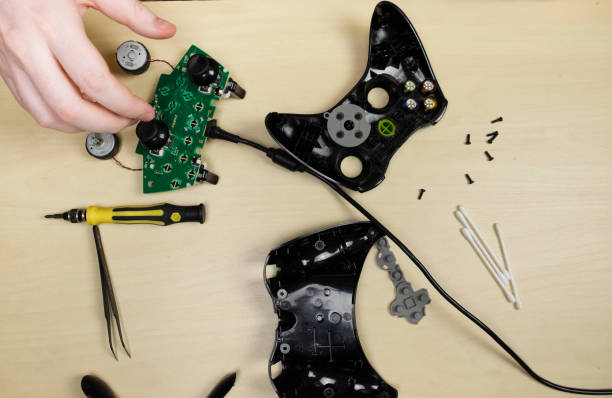
What we doWe replace the analog stick or its module and check the buttons, the USB port and other controller parts. For another common controller problem, read the article about controller vibration.

07from 50 €

Nintendo Switch does not charge or does not work with the dock

WhyMost often the USB-C charging port wears out, the battery fails or the dock breaks. Sometimes a chip in the charging circuit fails, and the console does not respond even when connected to power.

Check it yourselfTry the original charger and a different cable, and charge the console without the dock. Check whether there is any dirt in the port, but do not insert metal objects into it and do not open the casing.

What we doWe replace the charging port, check the charging circuit and the battery and, if necessary, replace faulty components.

08from 20 €

Switch Joy-Con drift or unresponsive buttons

WhyThe sticks of the Joy-Con controller wear out extremely quickly, and the button contacts wear down or get dirty. As a result, the character moves on its own or commands are not registered.

Check it yourselfUpdate the controller firmware and repeat the calibration in the settings. If one Joy-Con works and the other does not, this helps to identify the faulty side more quickly.

What we doWe replace the analog stick or the button module, and check the connection board and the rest of the controller electronics.

09from 25 €

Xbox does not turn on or freezes at the logo

WhyThe causes include the power supply unit, corrupted software, hard drive errors or a motherboard failure. If the console freezes on the green screen or in a boot loop, corrupted system software is often to blame.

Check it yourselfCheck the power cable and the socket, disconnect the console from power for a minute, then restart it. Do not open the console or its power supply unit – there is dangerous voltage inside.

What we doWe check the power supply unit and the motherboard, restore the software, and replace the drive or other faulty parts.

10from 25 €

Console freezes, shows error codes or games will not launch

WhyThis may be a software malfunction, corrupted system files, a full or failing drive, or a hardware fault that at first shows up only as errors.

Check it yourselfCheck the free space on the drive and update the system. Write down the error code and when it appears – this greatly helps with diagnostics.

What we doWe distinguish between software and hardware causes, restore the system, replace the drive or repair the motherboard.
Console repair prices

Diagnostics come first, followed by an exact repair price, which we agree with you before starting work.

Diagnostics

ServicePriceWarranty
Initial diagnostics10 €–

Controllers and drives

ServicePriceWarranty
Replacing the controller’s analog stickfrom 20 €–
Disc reader repair or replacementfrom 45 €–

Video, power and cooling

ServicePriceWarranty
Console cleaning and thermal paste replacementfrom 30 €–
HDMI port replacementfrom 60 €–
Power circuit or charging port repairfrom 50 €–

Motherboard and software

ServicePriceWarranty
Software restorationfrom 25 €–
Motherboard repair, BGA chip replacementfrom 90 €–
Prices are indicative. We will tell you the exact price and timeframe after diagnostics, and we start the repair only with your consent.

Is it worth repairing? Calculate in 10 seconds

Enter the numbers and we will show whether the repair is worthwhile. We will tell you the exact repair price after diagnostics (10 €).

Myths about console repair

  • Myth. If a console does not turn on, it is definitely broken beyond repair. In fact. The cause is often the power cable, the port or a separate part of the power circuit. Such faults can be repaired and cost considerably less than a new console.
  • Myth. It is enough to blow out the dust and the console will no longer overheat. In fact. Dust is only one cause. After a few years the thermal paste dries out and the fan wears down, so cleaning without replacing the paste gives only a temporary effect.
  • Myth. Controller „drift” means you need to buy a new controller. In fact. Most often only the analog stick wears out, and it can be replaced. A new original controller costs more than replacing a part.
  • Myth. Opening a console at home is easy because it is like a computer. In fact. Consoles contain glued parts, flat cables, a mains-voltage power supply unit and small chips that are easy to damage. Unprofessional disassembly often makes the fault worse.

Is it worth repairing a console or buying a new one

The answer depends on the numbers. Simple faults, such as an HDMI port, overheating or a controller stick, usually cost considerably less than a new console, so repairing them is generally worth it.

The situation is more serious when the fault affects the motherboard and the console is already old and out of warranty. In that case, after the diagnostics we tell you the real price, and you can choose whether to repair it. If you decide not to repair it, you will only pay for the diagnostics, €10.

Technician’s tip: before buying a new console, also compare the repair price with its price together with access to your games and account.

An opened game console with a cooling system and motherboard

Which consoles we repair and what they most often „suffer” from

We repair consoles from the most popular manufacturers. Problems differ between manufacturers because the design and usage habits differ.

Console repair in Kaunas, Vilnius, Klaipėda and Šiauliai follows the same principle: diagnostics, price, then the work. You can read about what this looks like in one place in the article about console repair in Kaunas.

  • PlayStation – PS5 (Slim, Pro and earlier versions), PS4, PS3 and older generations. Common problems: power supply, overheating, HDMI port, disc drive, controllers.
  • Xbox – Xbox One, Series X/S, Xbox 360. Common problems: system not starting, power supply unit, disc, overheating.
  • Nintendo – Switch, Switch Lite, Wii, 3DS. Common problems: Joy-Con „drift”, charging port, battery, screen.

If the console has travelled with you, pack it carefully without loose cables – most Switch and 3DS faults are caused by impacts and damaged ports.

Data, account and storage

Games and saved data are usually stored on the console’s drive and in the cloud. If your console holds important saved data, take care of it in advance: turn on cloud sync or copy it to an external drive if the console still works.

When repairing the motherboard or replacing the drive, data may be lost, so it is better to back it up in advance. For insurance purposes, we can issue a certificate that you can submit to your insurance company.

Technician’s tip: make a note of whether you use two-factor authentication and keep your phone at hand – it will be useful when recovering your account.

How to extend your console’s life

Most faults are caused by wear or poor conditions. Place the console so that there is a gap of at least a few centimetres around it, keep it away from radiators and do not put it in a closed cabinet without ventilation.

Do not pull the HDMI and power cables by the cord, and do not connect the console through poor-quality extension cords. If you get an overheating warning or the fan is louder than before, do not wait – early cleaning costs considerably less than a motherboard repair.

Before bringing in your console

  • Bring the console, the power cable and, if the fault is related to the picture, the HDMI cable
  • Bring the faulty controller if the problem is with it, and the dock if it concerns a Switch
  • Remove the disc from the drive if the console allows it, and bring the problematic game
  • Write down when the fault appeared and what the console does: blinks, hums, shows an error
  • Save your game data in the cloud or on an external drive if the console still works
  • Sign out of your account or have your passwords ready so that the technician can check the system
  • If you would like a certificate for insurance, mention it when you arrive

From drop-off to pick-up

  1. You come to the service point. Choose the nearest service point in Vilnius, Kaunas, Klaipėda or Šiauliai and come on weekdays 9:00–18:00. You do not need to register or call in advance.
  2. You describe the problem. Tell us what the console does and when it started. The more precisely you describe the symptoms, the faster we will understand where to look.
  3. We carry out diagnostics. The initial diagnostics cost €10. We check the power supply, video output, cooling, disc drive and software.
  4. We agree on the price. After the diagnostics, we tell you the cause of the fault, the repair price and the turnaround time. We start the repair only after receiving your consent.
  5. Repair and warranty. We replace faulty parts with original components and carry out the work. A warranty is provided for the work performed.
  6. You collect your console. We test the console together with you. If needed, we issue a certificate for the insurance company.

Customers often ask about console repair

Do you repair the PS5 Slim and PS5 Pro?

Yes, we repair various versions of the PlayStation 5, as well as the PS4 and older consoles. We determine the fault after diagnostics, which cost €10.

Is it possible to repair a PlayStation controller?

Yes. Most often we replace worn analog sticks and repair the buttons and the charging port. Simple controller repairs start from €20.

Do you repair the Nintendo Switch?

Yes, we repair the Switch, Switch Lite and older Nintendo consoles. Most often the issues are the charging port, battery, Joy-Con sticks and overheating.

Do you repair consoles in Panevėžys?

Our service points are in Vilnius, Kaunas, Klaipėda and Šiauliai. Residents of Panevėžys can visit any of them on weekdays, 9:00–18:00.

Can you issue a certificate for insurance?

Yes, we can issue certificates for insurance companies and other institutions. Please mention this when you arrive so that we can prepare the documents properly.

Will my games and saved data remain after the repair?

It depends on the fault. When repairing an HDMI port or a controller, the data is not changed, but when replacing the drive or the motherboard, it may be lost. Therefore, save it to the cloud in advance.

What our customers say

All reviews
  • Mindaugas Atas

    2020 · Google

    I had my Xbox console repaired at El meistrai. They accepted it, diagnosed the fault within a day and told me the repair price. Within 10 days of receiving the part, they fixed it. Thank you

  • Dovilė Sabaliauskienė

    August 2026 · Google

    Sincerest thanks to the technician from Šiauliai and the highest recommendations to the entire elMeistrai staff in Kaunas. ⭐⭐⭐⭐⭐

  • Milena Tulickaite

    December 2025 · Google

    Fast, high-quality, polite and clear☺️

  • Gytenis Mikulenas

    2025 · Google

    Excellent service! Instead of paying 1K to Apple certified dealer service for replacing broken Macbook mainboard, elmeistrai did it for much much cheaper!

Is your device broken?

Give us a call – we will tell you what we can do and how long it will take.

Call Find a service point