Diagnostics €10 · no registration required

Cartridge refilling in Vilnius, Kaunas, Klaipėda, Šiauliai

Cartridge refilling for laser printers (HP, Canon, Samsung, Brother and others): prices in the price list from €12 including VAT, and when the cartridge is in stock, replacement takes about 5 min.

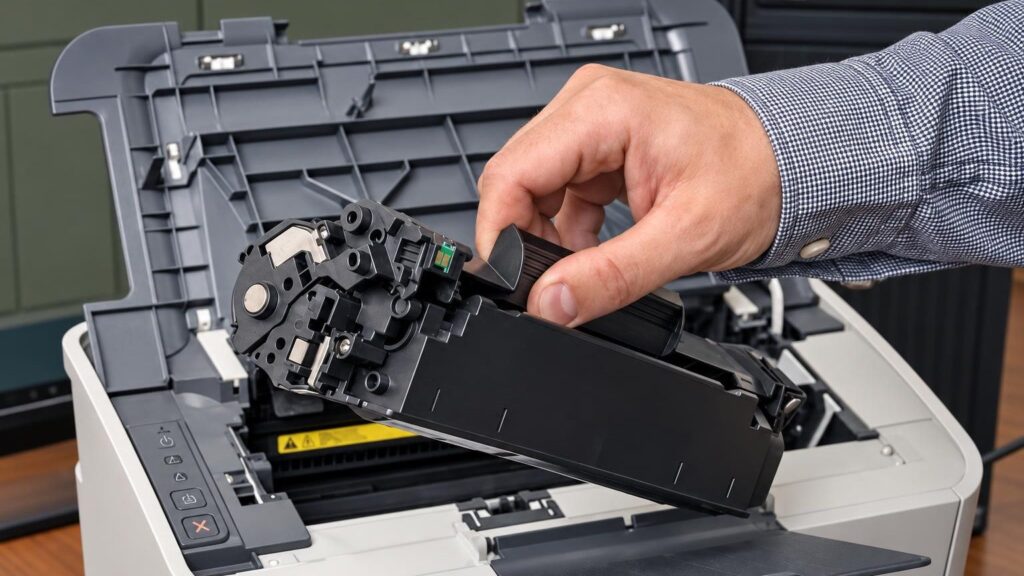
Laser printer cartridge prepared for refilling at the service center from €12Cartridge refilling for laser printers Warranty on work
from €12
Cartridge refilling for laser printers
€10
Initial printer diagnostics
~5 min.
Swap when the cartridge is in stock
4 cities
Service points: Vilnius, Kaunas, Klaipėda, Šiauliai

4 service points – bring it to the nearest one

  1. Vilnius Kareivių g. 11A, Žirmūnai +370 679 74770
  2. Каунас Baltijos g. 58, Šilainiai +370 656 95553
  3. Клайпеда Sausio 15-osios g. 13 +370 617 77731
  4. Šiauliai Gegužių g. 30, PC „Arena“ +370 659 83704
  • No appointment needed
  • Diagnostics €10
  • Mon–Fri 9–18
  • All contacts

Cartridge refilling is a simple way to reduce printing costs without buying a new cartridge. You can bring an empty laser cartridge to the service point and get it back refilled, or pick up a ready-refilled cartridge of the same model straight away for the same price. The price list includes several dozen cartridge types – from €12 for older HP cartridges to €28 for Konica Minolta.

This page covers prices, the symptoms that show the problem is in the cartridge (and not in the printer itself), and answers to the questions people most often ask before refilling. If you first want to understand how a cartridge works, read the article on replacing and maintaining laser cartridges. If spots or streaks persist even with a new cartridge, that is a matter for printer repair.

  • How much does cartridge refilling cost? In the price list – from €12 incl. VAT. The price depends on the cartridge model, its capacity and whether a microchip (chip) is needed. The most common cartridges cost €15–25.
  • How long does it take? When the required cartridge is in stock, swapping to a refilled one takes about 5 minutes. We keep many cartridges in stock, but not all models.
  • Do I need an appointment? No. You don’t need to book or call ahead – just visit any service point Mon–Fri 9:00–18:00. We are closed at weekends.
  • Is the cartridge covered by a warranty? Yes, a warranty is provided for cartridges and for the work carried out. You can ask about its terms at the service point.

Cartridge refill or another problem: what the symptoms indicate

Printing defects look similar, but their causes differ. Below are the symptoms as people type them into a search, and what usually lies behind them. You can see the cartridge refill price in the price list, and the initial printer diagnostics cost €10.

01from 12 €

The printer prints faintly or with faded output

WhyThe most common cause is that the toner in the cartridge is running out. Less often, a worn drum or an enabled toner-saving mode is to blame.

Check it yourselfOpen the printer cover, take out the cartridge and carefully shake it horizontally back and forth, then put it back in. Check whether the toner-saving mode is enabled in the print settings.

What we doWe check the cartridge and refill the toner, or replace it with an already refilled one – according to the price list, the cartridge refill price starts from €12. If the faintness persists, we check the drum and other components: the initial diagnostics cost €10, and the repair price is agreed after the diagnostics.

02from 12 €

The printer does not print in black

WhyThe cartridge is empty, the toner supply is clogged, or the cartridge contact is damaged. In colour printers, it may be specifically the black cartridge that is empty.

Check it yourselfMake sure the cartridge is inserted all the way and that the protective strip or film has been removed from the new cartridge.

What we doWe test the cartridge, then refill or replace it (refill price according to the price list). If there is toner but nothing prints, we check the drum and the cartridge contacts – the €10 initial diagnostics applies to this.

03from 5 €

The printer does not detect the cartridge or says „cartridge not compatible“

WhyAfter a refill or with a non-original cartridge, the printer sometimes fails to recognise the microchip (chip). The contacts may also be dirty, or the cartridge may not be suitable for the model.

Check it yourselfRemove and reinsert the cartridge, and gently wipe the visible contacts with a dry cloth. You will find more tips in the article printer does not show the cartridge.

What we doWe check whether the cartridge matches the model and, if necessary, transfer or install a new chip. Chip prices start from €5 (see the chip price list); for some models, we order the chip separately.

0410 €

Black streaks or stripes across the whole page

WhyMost often the drum is damaged, the cleaning blade is worn, or the waste toner container is too full. Too much toner or unsuitable toner can also leave streaks.

Check it yourselfPrint a test page and see whether the streaks repeat at an even distance – this points to the drum or a roller. More in the article why a laser printer prints faintly.

What we doFirst we determine the cause: the initial diagnostics cost €10. Then we clean the inside of the cartridge, replace worn parts, or suggest replacing the cartridge. If the streaks remain with a different cartridge, we diagnose the printer itself, and the repair price is agreed after the diagnostics.

05from 12 €

Toner stains, grey background or crumbling toner

WhyA worn drum or cleaning blade, a leaking cartridge, or the wrong type of toner. A grey background indicates that toner is getting where it should not.

What we doWe check whether the cartridge is leaking, clean it and refill it with the right type of toner (refill price according to the price list). If the drum is worn, we will tell you whether it is worth repairing or whether it is better to replace the cartridge.

06from 5 €

Printer shows an error after the cartridge has been refilled

WhyMost often it is an unrecognised chip or an incorrectly inserted cartridge. Sometimes the printer registers that the cartridge has been refilled and shows a low toner level even though it is full of toner.

Check it yourselfTurn off the printer, remove the cartridge, wait a minute and reinsert it. Do not open the inside of the printer itself.

What we doWe check whether the cartridge matches the model and, if necessary, transfer or replace the chip (e.g., Xerox 3020, Minolta 1480/1490, Xerox 3119). Chip prices are listed in the chip price list.

07from 18 €

HP M110w or M140w cartridge not working after refilling

WhyHP LaserJet models with the letter “e” at the end of the name (e.g., M110we, M140we) are designed for the HP+ service and do not allow the use of compatible cartridges. In such devices, a refilled cartridge will not work.

Check it yourselfLook at the model name on the printer: if it ends with “e”, compatible cartridges will not work.

What we doWe check whether your model is compatible with the HP 142A cartridge. For models without “e”, a refill costs €18 (without a microchip, your chip is transferred) or €25 (with a microchip).

08

Cartridge does not fit or does not seat properly in the printer

WhyCartridges for similar models differ in size or mounting. For example, a cartridge intended for the P2050 series does not fit the HP LaserJet P2035, even though the codes are similar.

Check it yourselfCompare the cartridge code with the one indicated on the label on the cartridge or the printer.

What we doWe select the correct cartridge according to the model. If your model is not in the price list, bring in the cartridge and we will tell you whether we can refill it.
Cartridge refill prices and chip price list

Below are the most frequently refilled cartridges and microchips (chips); all prices include VAT.

Chips (microchips)

ServicePriceWarranty
Xerox 3119 chip (fits the K11 cartridge)5.0 € incl. VAT–
Xerox 3020 chip (a Samsung K6 cartridge will become a K23; chip made to order in 3–5 business days)9.0 € incl. VAT–
Minolta 1480/1490 chip („simcard”; Xerox 3100 will become a K24)9.0 € incl. VAT–
Minolta M1200 chip (fits the K14 cartridge)5.0 € incl. VAT–

HP and Canon cartridges

ServicePriceWarranty
HP 12A/13A/15A/24A and similar (HP LaserJet 1000, 1150, 1200, 1300) – refillingfrom 12 €–
HP CE285A / Canon 725 / HP CB435A / CB436A – refilling or replacement15 €–
HP 142A (M110w, M140w) – refilling: without a microchip (yours is transferred) / with a microchip18 € / 25 €–
HP 226A/226X / Canon 052 (high capacity) – refilling20 €–

Brother, Samsung and Xerox cartridges

ServicePriceWarranty
Brother TN-2010 / TN-2220 / TN-2280 – refilling18 €–
Brother TN-2320 / TN-2330 / TN-660 – refilling15 €–
Samsung MLT-D101S (ML 2160, SCX 3400 series) – refilling18 €–
Xerox Phaser 3020 / WorkCentre 3025 (K23) – refilling20 €–

Other services

ServicePriceWarranty
C15.0 € incl. VATK11
C29.0 € incl. VATA Samsung K6 cartridge will be treated as a K23 when a new K23 cartridge is needed (chip made to order in 3-5 business days)
C39.0 € incl. VATXerox 3100 will be a K24
C45.0 € incl. VATK14
Prices include VAT. You can see the cartridge refill price in the price list; the cartridge type and whether a microchip is needed are confirmed on arrival. If the problem is with the printer, the initial diagnostics cost 10 €, and the repair price is given after diagnostics and agreed before any work begins.

Myths about cartridge refilling

  • Myth. A refilled cartridge always prints worse than a new one. In fact. Quality is determined by the type of toner and whether worn parts have been replaced, not by the refilling itself. A well-refilled cartridge prints similarly to a new one.
  • Myth. A cartridge can be refilled an unlimited number of times. In fact. The toner can be refilled, but the drum, cleaning blade and magnetic roller wear out. When spots or streaks appear, it is often worth replacing the cartridge.
  • Myth. Refilling can damage the printer. In fact. Problems are caused by poor or wrong-type toner and a leaking cartridge. A correctly refilled cartridge does not harm the printer.
  • Myth. Toner is the same everywhere, so you can pour in any kind. In fact. Cartridges from different manufacturers require different toner properties (melting temperature, particle size). Unsuitable toner leaves spots or spills. Read more about this in the article on toner types.

Cartridge refill or exchange for an already refilled one

For the price listed in the price list, we refill your cartridge, or we can exchange your cartridge for an already refilled one, with no waiting on site. The second option is convenient when you need to print right here and now. The exchange takes about 5 min. if the required cartridge is in stock.

It is worth comparing the prices with a new cartridge: in the price list you can see the exact refill price, so you know in advance how much each refill will cost. For some cartridges, the price differs depending on whether a microchip is needed.

  • Refilling is suitable when the cartridge is in good condition and has just run out of toner.
  • Exchange for a refilled one is suitable when you are in a hurry or the cartridge is already worn.
  • For some cartridges (e.g., HP 142A, HP 259A), the price differs depending on whether a microchip is needed.

Technician’s tip: bring the cartridge together with the printer model name – you will save time selecting the correct code.

A technician inspects the drum of a laser printer cartridge

Which cartridges we refill

The price list includes HP, Canon, Samsung, Brother, Xerox, Pantum, Epson, Ricoh, Lexmark, Konica Minolta and Dell cartridges, including the HP LaserJet M110w and M140w (HP 142A) and the Brother HL-L2300 series (TN-2320/2330).

If your model is not on the list, for example the Brother HL-L2400DW, bring in the cartridge and we will tell you whether we can refill it. It is important to know two exceptions: HP+ models with the letter „e” do not work with compatible cartridges, and for some models, cartridges without a chip require the old microchip to be transferred.

  • HP and Canon: usually €15–20
  • Samsung: from €15 for black, €24–26 for colour sets
  • Brother: €15–23, depending on the TN series
  • Xerox, Konica Minolta, Pantum, Epson: €20–28

When the printer, not the toner, is to blame

If printing defects persist after the cartridge is refilled, the problem may be in the drum, the fuser unit or the control board. In that case, replacing the cartridge is pointless. In such a case, the initial printer diagnostics cost €10, and we will tell you the repair price after the diagnostics and agree on it with you before any work begins.

For a home or small office considering a new device, the laser vs. inkjet printer guide offers a useful comparison. Before buying a new one, check whether refillable cartridges will be easy to find for it. The risks to avoid when refilling a cartridge yourself are described in the article the dangers of refilling a laser cartridge.

Technician’s tip: if smudges repeat at the same distance along the page, it is a sign that the drum or roller is to blame.

Before you bring in the cartridge

  • Bring the empty cartridge and, if you can, the printer model name
  • Check whether the model name ends with the letter „e” (HP+ devices)
  • Do not open the cartridge yourself, so that the toner does not spill
  • Bring a test page if it shows smudges or streaks
  • Make sure the cartridge is in a closed box or bag that will not get anything dirty
  • Come Mon–Fri 9:00–18:00 – the service points are closed on weekends

From drop-off to refill

  1. Come to any service point. You do not need to book or call in advance. Drop in at our locations in Vilnius, Kaunas, Klaipėda or Šiauliai Mon–Fri 9:00–18:00.
  2. Show the cartridge and the printer model. The technician uses the code to determine which price list cartridge suits you and whether a chip is needed.
  3. Refill or replacement. We refill the cartridge or replace it with an already refilled one. When the cartridge is in stock, this takes about 5 min.
  4. The price is clear in advance. You can see the refill price in the price list. If the problem is with the printer, the initial diagnostics cost €10, and the repair price is agreed before any work begins.
  5. Warranty. A warranty is provided for cartridges and completed work. You can ask about its terms at the service point.

Customers often ask about cartridge refilling

Do you refill inkjet cartridges?

The price list on this page includes only laser cartridges. For inkjet ones, come to the service point with the cartridge and ask – we will tell you whether we can help.

Do you refill cartridges in Panevėžys or Alytus?

Our service points operate only in Vilnius, Kaunas, Klaipėda and Šiauliai. We do not provide services in other cities.

Can my HP M110w or M140w cartridge be refilled?

Yes, if the model name does not end with the letter „e”. The HP 142A cartridge is suitable: refilling without a microchip (yours is transferred) costs €18, with a microchip – €25. In models with an „e”, compatible cartridges will not work.

Why is refilling one cartridge cheaper than another?

The price depends on the cartridge capacity, the amount of toner, the materials and whether a microchip is needed. For example, refilling an HP 12A costs from €12, while a Konica Minolta 1480/1490 costs €28.

Can I refill a cartridge myself at home?

It is possible, but it is messy and risky: toner is very fine, and unsuitable toner can damage the printer. You will find the steps in the article how to refill a cartridge at home.

How do I choose the right cartridge for my printer?

Look at the code on the cartridge and at the printer model. You can find more information in the article how to choose a cartridge for your printer.

What our customers say

All reviews
  • Dovilė Sabaliauskienė

    August 2026 · Google

    Sincerest thanks to the technician from Šiauliai and the highest recommendations to the entire elMeistrai staff in Kaunas. ⭐⭐⭐⭐⭐

  • Milena Tulickaite

    December 2025 · Google

    Fast, high-quality, polite and clear☺️

  • Gytenis Mikulenas

    2025 · Google

    Excellent service! Instead of paying 1K to Apple certified dealer service for replacing broken Macbook mainboard, elmeistrai did it for much much cheaper!

  • Raimondas Bakšys

    2025 · Google

    I bring in all kinds of equipment for repair and they always fix it quickly, well and at a fair price. Thank you! …

Is your device broken?

Give us a call – we will tell you what we can do and how long it will take.

Call Find a service point