Diagnostics €10 · no registration required

Mazda navigation map update

Mazda navigation map updates for DVD, SD card and Mazda Connect systems – with detailed Lithuania and Europe. Initial diagnostics €10.

Navigation update in Kaunas – a technician checks a navigation unit at the Šilainiai service centre DVD, SD, ConnectWhich Mazda systems we update Warranty on work
DVD, SD, Connect
Which Mazda systems we update
from 60 €
Map update
10 €
Initial diagnostics
4 cities
Vilnius, Kaunas, Klaipėda, Šiauliai

4 service points – bring it to the nearest one

  1. Vilnius Kareivių g. 11A, Žirmūnai +370 679 74770
  2. Kaunas Baltijos g. 58, Šilainiai +370 656 95553
  3. Klaipėda Sausio 15-osios g. 13 +370 617 77731
  4. Šiauliai Gegužių g. 30, PC „Arena“ +370 659 83704
  • No appointment needed
  • Diagnostics €10
  • Mon–Fri 9–18
  • All contacts

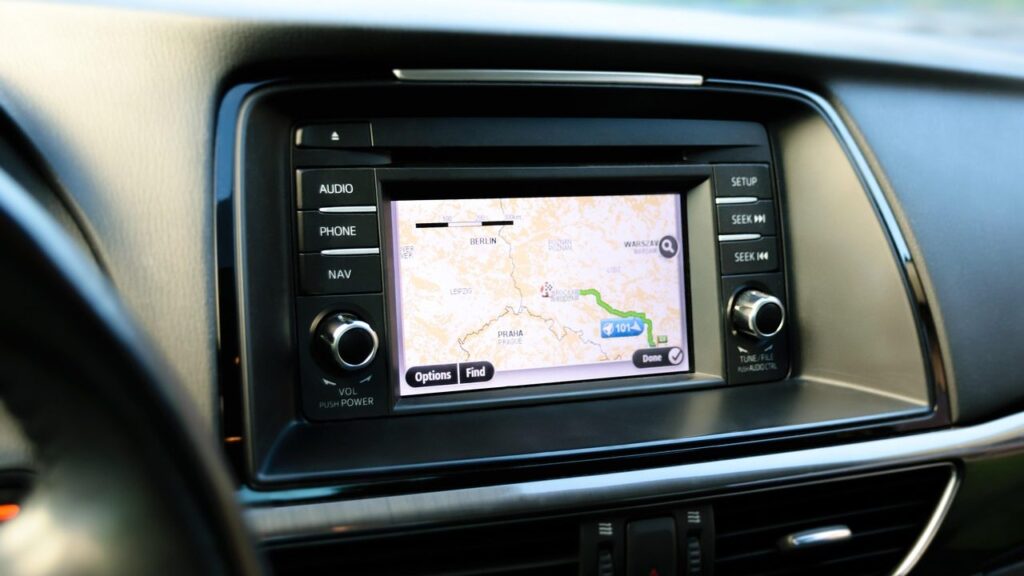
A Mazda navigation map update is needed when the system doesn’t know about new roads, roundabouts or speed limits and starts guiding you to places where nothing has existed for a long time. We update Mazda systems with Denso DVDs, an SD card (Multi-model Navigation) and Mazda Connect with a 7-inch screen.

Visit any service point during working hours – no appointment needed. First we determine which system your car has, then we tell you the price. General information about systems of all brands is on the navigation update page.

  • How much does the update cost? According to the price table, a map update starts from 60 €. We tell you the exact price after diagnostics, which costs 10 €, and agree on it before the work.
  • Do I need to book an appointment? No. Simply visit any elMeistrai service point in Vilnius, Kaunas, Klaipėda or Šiauliai Mon–Fri 9:00–18:00.
  • Which Mazda models is it suitable for? For example, Mazda 3, 5, 6, RX-8, CX-7, CX-9 with DVD, 2010–2014 with an SD card and 2015–2016 with Mazda Connect.
  • What warranty is provided? We provide a 12-month warranty for map updates. For other work, the warranty is specified when agreeing on the repair.
How to tell that your Mazda maps are outdated

These symptoms usually mean that new maps are enough, but sometimes the disc, card or reader is to blame.

01from 60 €

Mazda navigation shows the wrong location

WhyMost often the map is outdated: new roads, roundabouts and neighbourhoods simply don’t exist in it, so the car is shown „off-road”. A less common cause is a weak GPS signal.

Check it yourselfDrive to an open area away from tall buildings and wait a few minutes. If the error persists, outdated maps are the most likely cause.

What we doWe check the system and install the latest maps of Lithuania and Europe.

02from 60 €

Navigation leads along an old route or a closed road

WhyThe map does not include new traffic layouts, one-way streets or speed limit changes.

What we doWe update the maps according to your system type: DVD, SD card or Mazda Connect.

03from 80 €

Navigation disc is not read

WhyThe disc is scratched, or the DVD reader is dirty or worn. This is quite common in older Denso systems.

Check it yourselfCheck whether the disc is scratched, and carefully wipe it with a soft cloth from the centre to the edges.

What we doWe diagnose whether the disc or the reader is at fault, and choose a solution.

04from €40

Card is not recognised or shows an error

WhyThe SD card is damaged, the files are corrupted, or the card is not compatible with the car’s system.

What we doWe check the card and the system, and restore or reinstall the maps.

05from 40 €

Navigation does not work after a battery replacement

WhyWhen the power is interrupted, the system sometimes loses its settings or asks for a code. The cause may also be a software error.

Check it yourselfWait until the system has fully started and check whether there is a message about a code. Do not enter the code at random.

What we doWe determine the cause of the error and restore the system’s operation.

0610 €

Why navigation is not working on the Mazda screen

WhyIt may be a software error, a map that does not start, a missing card, or a technical problem with the system.

Check it yourselfCheck whether the navigation card or disc is inserted, and switch the ignition off and on again.

What we doWe run diagnostics and tell you whether an update is enough or repair is needed.

Mazda navigation map update: prices

The price depends on the system type and the map package.

Map updates

ServicePriceWarranty
Denso DVD system (Mazda 3, 5, 6, RX-8, CX-7, CX-9)from €7012 months
SD card, Multi-model Navigation (2010–2014)from 60 €12 months
Mazda Connect, 7-inch screen (2013–2016)from 60 €12 months

Repair and software

ServicePriceWarranty
Recovery of a damaged SD cardfrom 40 €–
Fixing a navigation software errorfrom 40 €–
DVD reader repair or replacementfrom 80 €–
Prices are indicative; we agree the exact price after diagnostics, before starting work.

Myths about updating Mazda navigation

  • Myth. It is enough to download maps from the internet and put them on a card. In fact. Maps usually have to be suitable for the specific system type and model year, so a random file may not be recognised.
  • Myth. Updating the maps will also change the look of the system. In fact. Roads, addresses and points of interest are updated, while the menu and interface stay the same.
  • Myth. If the navigation makes mistakes, the GPS receiver is broken. In fact. More often an outdated map is to blame. We suspect the receiver only when errors persist even with a new map.

Which Mazda system is in your car

The system is most often determined by the year of manufacture. Mazda 3, 5, 6 and RX-8 with Denso use DVD discs, while the CX-7 and CX-9 use a disc with Eastern Europe maps. Cars from 2010–2014 use an SD card, and the 2015–2016 Mazda 2, 3, 6, CX-3, CX-5 and MX-5 use Mazda Connect with an SD card.

If you are unsure, a photo of the screen and the car’s year will help us identify the type faster.

  • Denso DVD: maps on three discs (Western, Northern and Eastern Europe)
  • Multi-model Navigation: 4 GB SD card
  • Mazda Connect: 7-inch screen and SD card

Technician’s tip: the most important thing is a detailed map of Lithuania, which is included in all packages.

A technician checks a portable GPS navigation unit in the workshop

When to update and when to repair

If the system works but shows outdated roads, an update is enough. If it does not read the disc, the card is not recognised or the screen freezes, diagnostics are needed first. Read more about the process in the articles how to update your car navigation and why navigation shows the wrong location.

Before you bring it in

  • Car year of manufacture and model
  • Original SD card or navigation discs, if you have them
  • The car with the working navigation, if the system is built in
  • Navigation PIN code, if one was provided
  • A short description of when the problem appeared

From arrival to pick-up

  1. Come to the service point. Choose any elMeistrai service point and come Mon–Fri 9:00–18:00. No registration is needed.
  2. We identify the system. We check whether it is a DVD, SD card or Mazda Connect system. Initial diagnostics cost €10.
  3. We agree on the price. We tell you what is needed and quote the price before starting work.
  4. We update or repair. We install the latest maps or fix the fault.
  5. We check and hand it back. We check that the system works and provide a warranty.

Customers often ask about Mazda navigation

How much does a Mazda navigation update cost?

Map updates start from €60. We give the exact amount after diagnostics and agree on it before work begins.

Will the maps be in Lithuanian after the update?

Yes, all packages include a detailed map of Lithuania along with other European countries.

Can I use navigation without internet?

Mazda factory navigation works with pre-installed maps, so no internet is needed. This is one of the reasons to update it rather than rely on a phone.

What should I do if I don’t know which system I have?

Come in with your car or send us a screenshot of the screen. You can find more about the process in the article how to install new maps.

Other car brands

Professional navigation update – prices, process and service points

Is your device broken?

Give us a call – we will tell you what we can do and how long it will take.

Call Find a service point