Diagnostics €10 · no registration required

Computer repair: Vilnius, Kaunas, Klaipėda, Šiauliai

Computer repair for desktop and laptop computers: first diagnostics for 10 €, then a clear price and deadline. Come to the service point without an appointment.

Laptop repair at the elMeistrai service center Desktop and laptopWhat we repair Warranty on work
Desktop and laptop
What we repair
10 €
Initial diagnostics
from 20 €
Software work
4 cities
Service points

4 service points – bring it to the nearest one

  1. Vilnius Kareivių g. 11A, Žirmūnai +370 679 74770
  2. Kaunas Baltijos g. 58, Šilainiai +370 656 95553
  3. Klaipėda Sausio 15-osios g. 13 +370 617 77731
  4. Šiauliai Gegužių g. 30, PC „Arena“ +370 659 83704
  • No appointment needed
  • Diagnostics €10
  • Mon–Fri 9–18
  • All contacts

Computer repair at elMeistrai service points starts with diagnostics, not guesswork. When a computer won’t turn on, keeps shutting down on its own or shows a black screen, the symptom is often deceptive: behind the same “it doesn’t work” there can be either a cheap cable or a faulty motherboard. That is why we first find the real cause and only then tell you the price. If you are looking for why a computer won’t turn on, start with the symptom guide below.

Our service points operate in Vilnius, Kaunas, Klaipėda and Šiauliai, Mon–Fri 9:00–18:00. You do not need to register, and calling in advance is not necessary either – just come with your computer. We repair both laptops and desktop computers, handling both hardware faults and software.

  • How much does computer repair cost? The initial diagnostics cost 10 €. Software work starts at 20 €; we give the price of hardware repair after diagnostics; parts are charged separately.
  • How long does it take? We carry out diagnostics within 1 business day. The repair itself usually takes 1–4 days; we state the exact timeframe together with the price.
  • Do I need to register? No. Come to any service point during working hours, Mon–Fri 9:00–18:00. Calling before you arrive is not necessary.
  • Is it worth repairing the computer? Usually yes, if the repair costs considerably less than a similar new computer. After diagnostics, we will tell you the real price and our opinion.

Computer repair: what the symptoms indicate

People usually search not for the name of the fault, but for what they see: a black screen, silence when pressing the button, a sudden shutdown. Below are the most common symptoms, likely causes and what you can check yourself without taking anything apart.

01diagnostics €10

The computer won’t turn on

WhyMost often the power supply, charger or cable is to blame. Less often it is the RAM, the motherboard or a faulty power circuit chip in a laptop.

Check it yourselfTry a different socket or extension cord, check the power cable and the switch on the back panel of a desktop computer. Disconnect all USB devices and external headphones and drives. For a laptop, unplug the charger and hold down the power button for about 30 seconds, then reconnect. More options can be found in the article about a computer that won’t turn on when you press the button.

What we doWe measure supply voltages, check the memory, the power supply unit and the motherboard’s power circuits. If a socket is broken or a component has burned out, we replace or repair it.

02from 20 €

The computer shuts down on its own

WhyThis is a classic sign of overheating: a clogged cooler or dried-out thermal paste. Other causes include a weakening power supply or loosened components.

Check it yourselfCheck that the computer is not standing on a soft surface and that the ventilation openings are not covered. If the fan is running loudly, it likely needs cleaning. Read more about a computer shutting down on its own.

What we doWe clean the dust from the cooling system, replace the thermal paste, and check temperatures under load and the power supply.

0330 €

The laptop overheats and is noisy

WhyOver the years, a plug of dust builds up in the heatsink, the thermal paste hardens, and the processor and graphics chip heat up to 90–100 °C. As a result, the fan spins at maximum speed and the computer slows down.

Check it yourselfWe do not recommend simply spraying compressed air into the vents – the dust gets pushed deeper. It is better to place the computer on a hard, flat surface. For more tips, see ways to solve overheating and shutdowns.

What we doWe disassemble the computer, clean the cooling system, replace the thermal paste, and if the fan is worn out, we replace it.

04from 20 €

The computer runs slowly or freezes

WhyThere are many causes: an old mechanical drive, too little memory, too many programs launching at system startup, viruses, or a drive that is starting to fail.

Check it yourselfCheck how much space is left on the drive – if less than 10 % is free, the system often freezes. Review the list of programs that run at startup. For more details, see what to do if your computer is running slowly.

What we doWe check the condition of the drive, clean the system, and repair or reinstall the operating system. If the drive is old, we suggest replacing it with an SSD – after that, a slowed-down computer often feels like new.

05from 20 €

The browser shows ads, viruses detected

WhyMalware most often gets in together with „free” programs or through deceptive e-mails. It slows down the system, changes the browser’s home page, and sometimes steals passwords.

Check it yourselfDo not enter your bank passwords until the computer has been cleaned. Change your most important passwords from another, clean device. The steps are described in the article how to remove viruses from your computer.

What we doWe remove malware, save your data if necessary, and reinstall the system with drivers.

06from 20 €

The computer does not detect the hard drive

WhyA loose or damaged cable, or a faulty drive or controller. If you hear clicking or squealing, the mechanical drive is most likely failing.

Check it yourselfDo not keep restarting the computer „one more time” – every attempt can make the condition worse. If your data is important, it is better to bring it in right away. For an overview, see computer does not detect the hard drive.

What we doWe check the connections, the drive and the controller, try to save your data, and replace the drive with a new one or an SSD.

07from 12 €

Black, streaky or flickering screen

WhyIn a laptop, this may be a cracked screen panel, a damaged display cable, or worn hinges. In a desktop computer, it may be the graphics card, the video cable, or the monitor itself.

Check it yourselfConnect an external monitor or TV with an HDMI cable. If the image appears there, the computer is alive and the screen panel or its cable is to blame. About flickering, see causes of screen flickering.

What we doWe replace the screen panel, display cable, hinges, or lid. If the problem is in the graphics chip, we reflow or replace it.

08from 12 €

Laptop battery not recharging

WhyA worn-out battery, a faulty charger or its cable, or a worn power socket. After 3–5 years, battery capacity often drops by more than half.

Check it yourselfTry another outlet and, if you have one, a suitable charger of the same power rating. Inspect the cable for breaks near the plug. Do not pry at the battery or the charger. More at why the battery is not charging.

What we doWe diagnose whether the battery, charger, or socket is at fault, then repair the charger, replace the socket, or replace the battery.

09from 25 €

Computer with spilled liquid

WhyLiquid, especially sugary liquid, causes a short circuit and later corrosion. The damage often does not show up immediately, but after a few days or weeks.

Check it yourselfTurn off the computer immediately, unplug the charger, and turn the computer upside down. Do not try to turn it on „to see if it works” and do not use a hair dryer. Bring it to the service center as soon as possible.

What we doWe disassemble the computer, clean the board and the residue, check the circuits, and replace damaged parts.

10from 10 €

Keyboard or power socket not working

WhyThe keyboard may be damaged by spilled liquid or a worn cable, while the socket usually breaks because of a pulled cord or a stuck plug.

Check it yourselfCheck that the computer has not been started with the key lock function on, and connect an external USB keyboard. More at why the keyboard is not working.

What we doWe replace the keyboard or the socket, or restore its soldering on the board.
Computer repair prices

We provide prices for the main services; the cost of parts is not included and becomes clear after the computer is disassembled.

Diagnostics

ServicePriceWarranty
Initial diagnostics10 €–

Software and data

ServicePriceWarranty
Software work (system repair, virus removal)from 20 €–
Data backup during software work10 €–
Fresh system installation (when the recovery partition is damaged): driver search, installation of additional free programs10 €–

Cooling, screen and casing

ServicePriceWarranty
Dust cleaning of the cooling system, without replacing the thermal paste20 €–
Dust cleaning of the cooling system and thermal paste replacement30 €–
Screen replacementfrom 12 €–
Hinge or screen bracket replacementfrom 18 €–
Keyboard replacementfrom 10 €–
Fan replacementfrom 15 €–

Motherboard, power supply and components

ServicePriceWarranty
Socket replacement or repairfrom 18 €–
Motherboard repair or replacement, video chip reballingfrom 45 €–
Repair of a computer damaged by liquidfrom 25 €–
Charger repairfrom 12 €–
Apple MacBook repairfrom 12 €–
Hard drive or SSD replacementfrom 20 €–
RAM replacement or upgradefrom 12 €–
Desktop computer power supply unit replacementfrom 15 €–
Laptop battery replacementfrom 15 €–
Issuing a defect report for insurance (covered by the insurance)30 €–
Computer preparation for an organization and issuing a certificate of work performedfrom 25 €–
Prices are indicative and exclude parts; we agree on the exact price and deadline after diagnostics, before starting the repair.

Is it worth repairing? Calculate in 10 seconds

Enter the numbers and we will show whether the repair is worthwhile. We will tell you the exact repair price after diagnostics (10 €).

Myths about computer repair

  • Myth. If a computer has become slow, you need to buy a new one. In reality. Slowness is often caused by an old mechanical drive, dust, or too many programs. An SSD, more memory, and putting the system in order often bring an old computer back to life at a lower cost than a new one.
  • Myth. If a computer won’t turn on, the motherboard has failed. In reality. The motherboard is not at fault as often as people think. The cause is often the power supply, the charger, the memory, or a simple cable, so diagnostics are needed first.
  • Myth. A computer with spilled liquid just needs to be dried with a hair dryer or left in rice. In reality. Drying does not remove liquid residue, which later eats away at the board. You need to turn off the computer as soon as possible and hand it in for cleaning.
  • Myth. Dust cleaning is only necessary for gaming computers. In reality. Both office and home computers overheat, especially laptops with thin cooling. So it is worth dealing with the dust in the cooling system and the hardened thermal paste as soon as the computer starts to overheat or hum loudly.

Computer repair or a new purchase: a simple calculation

When the repair cost rises to half the price of a similar new computer, it is worth seriously considering buying one. However, repair often costs considerably less: dust cleaning with thermal paste – 30 €, keyboard replacement starts from 10 €, screen replacement – from 12 €.

Motherboard repair is more expensive (from 45 €), but even then the price is often lower than that of a new device. It all depends on the model and the availability of parts, so make the final decision after diagnostics, when you can see the full list of faults.

  • Repair is worthwhile if the computer is up to 5–6 years old and there is one clear fault.
  • It is worth considering a new one if several components have failed at the same time.
  • An old laptop with a slow drive is often better upgraded with an SSD and more memory.

Technician’s tip: take care of your data first – a computer is easy to replace, but lost photos or documents are not.

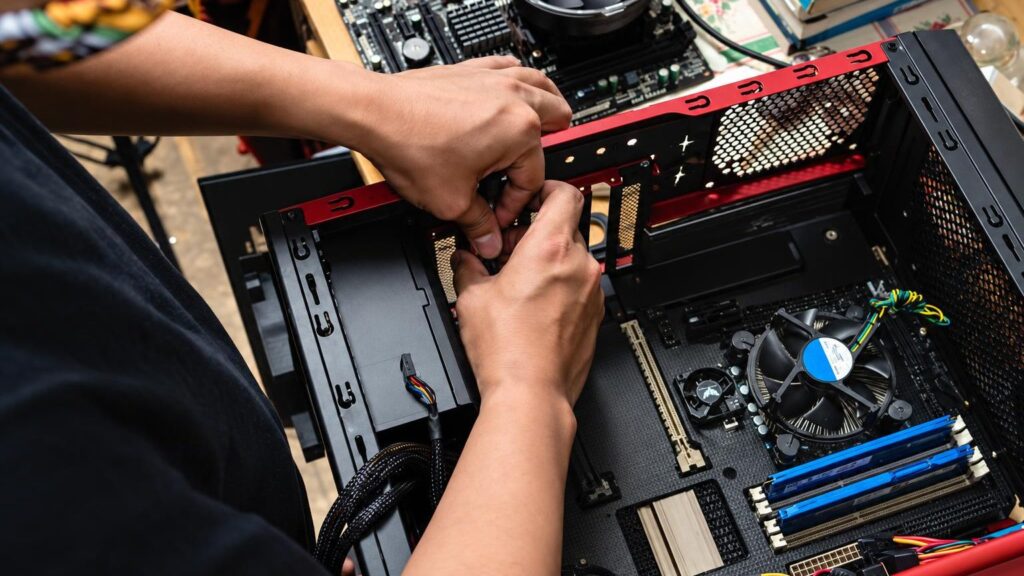
An opened desktop computer showing the cooling system and motherboard

Laptop and desktop computer repair: what’s the difference

Laptops have everything packed into a small space, so overheating, broken ports, a worn-out battery and cracked screens are more common. In desktop computers, components are easier to replace individually – the power supply, graphics card, drive or memory – so repair is often cheaper.

We repair computers from various manufacturers – Lenovo, Dell, HP, Asus, Acer and others, as well as Apple MacBook, iMac and iPad. If a computer is no longer manufactured and parts are hard to find, we will tell you after the diagnostics. You can also bring us phones or printers – see phone repair and printer repair.

Data, insurance and documents

Many customers bring in a computer not because of the device itself, but because of the data on it. When performing software work, we can save your files (10 €), and when a drive is failing, we will tell you after the diagnostics whether the data can be recovered. If the computer is covered by the owner’s insurance, we can issue a defect report for the insurer (30 €, paid by the insurance).

We provide a warranty for our work and, if needed, issue a certificate of the work performed – it is accepted by insurance companies and other institutions. We use original parts; we tell you their price in advance, before starting the repair.

Technician’s tip: back up your most important files to an external drive or the cloud at least once a month – then even a failed drive won’t be a disaster.

Before bringing in your computer

  • Bring the charger or power cable – even if you think the fault is elsewhere.
  • Note down when and under what circumstances the fault appeared (after rain, a drop, an update).
  • If you can, make a backup of your most important files or tell the technician that the data is important.
  • Know your system or account password in case the software needs to be tested.
  • Bring your insurance or purchase documents if a defect report or certificate is needed.
  • Remove unnecessary accessories: memory cards, floppy disks, USB devices.

From drop-off to pick-up

  1. Come to the service point. Choose the most convenient service point in Vilnius, Kaunas, Klaipėda or Šiauliai and come Mon–Fri 9:00–18:00. No appointment needed.
  2. Describe the problem. Tell us what you see and when the fault began. This shortens the troubleshooting time.
  3. Diagnostics for 10 €. The technician examines the computer and looks for the real cause. We carry out diagnostics within 1 business day.
  4. Price, deadline and consent. We provide a list of faults, the repair price and the deadline. We start work only with your consent.
  5. Repair and warranty. Repairs usually take 1–4 days, and the work performed is covered by a warranty.
  6. Pick-up. You collect the repaired computer at the same service point and, if needed, receive a certificate of the work performed.

Customers often ask about computer repair

Do you repair computers from Lenovo, Dell and other manufacturers?

Yes, we repair laptops and desktop computers from various manufacturers, as well as Apple MacBook, iMac and iPad. Whether parts can be obtained becomes clear after the diagnostics.

Can I bring a computer from Alytus, Panevėžys or Marijampolė?

Our service points are in Vilnius, Kaunas, Klaipėda and Šiauliai. If you live in another city, you can bring your computer to the one closest to you.

Will you save my data?

When performing software work, saving data costs 10 €. If the drive is failing, we will tell you after the diagnostics whether the data can be recovered and how much it will cost.

Can you issue a document for insurance?

Yes. Issuing a defect report for insurance costs 30 € and is paid by the insurance, and we issue a certificate of the work performed upon request.

Why does my laptop run out of battery quickly?

Most often the cause is a worn-out battery or a system that is running overloaded. These tips on how to extend battery life will help; if the capacity has already declined, the battery needs to be replaced.

Will I have to pay if the repair is not possible?

The 10 € diagnostics fee still applies. After it, we will tell you whether the repair is possible, how much it will cost and whether it is worthwhile, and the decision is yours.

What our customers say

All reviews
  • Gytenis Mikulenas

    2025 · Google

    Excellent service! Instead of paying 1K to Apple certified dealer service for replacing broken Macbook mainboard, elmeistrai did it for much much cheaper!

  • Rugile Ka

    2024 · Google

    Pleasant communication, repaired the computer quickly

  • Artūras Kuznecovas

    2023 · Google

    Good place if you want something fixed, not just replace parts. I brought a laptop with torn internal battery power socket and shorted circuits, I genuinely though it was a unfixable, but they managed to restore and fix the …

  • Nerija Kovalenkovienė

    2022 · Google

    They repaired the tablet computer quickly, to a high standard and really inexpensively. Very grateful

Is your device broken?

Give us a call – we will tell you what we can do and how long it will take.

Call Find a service point